Use one effect at a time in SP mode, combine several with CHOMP’s performance sliders, or arrange an ordered chain in the new Rack mode. Version 1.4 adds 16 effects, eight CHOMP banks and Linux support.
NEW Version 1.4 for Mac, Windows and Linux. The iPhone/iPad update is waiting for Apple review; the current App Store version remains available.
Three modes in every instance
Choose how you want to use the effects.
01 / SP Mode
SP: one selected effect.
Select an effect from the MFX list or one of 16 favorite pads. Adjust its six CTRL parameters with knobs, vertical sliders or horizontal sliders, then switch it in and out as you play.
Knobs, vertical or horizontal faders
Momentary and toggle switches
16 assignable favorite pads
02 / CHOMP Mode
CHOMP: combine effects with sliders.
Each tile controls an effect with a finger or mouse gesture. Use several together, tune how their parameters respond, and press HOLD to keep their amounts. The new A–H banks store eight combinations that you can switch between.
Only the selected bank sounds
Effect order and pages stay consistent across banks
8, 16 or 32 tiles per page; page through all 64
MIDI-mappable bank selection
03 / Rack Mode NEW
Rack: build an ordered effect chain.
Add up to eight inserts, including more than one copy of an effect. Audio passes through them from top to bottom: insert 1, then insert 2, and onward to the output. Each insert has its own controls and bypass.
Reorder inserts up or down
Bypass or remove individual effects
All six controls within each insert
Independent insert settings saved with your instance
Use different modes in the same session.
Put a Rack chain on a track, use SP mode for a single bus effect, and keep another instance in CHOMP for performance. Each copy is independent. Your host saves its effects, controls, bank combinations and Rack order with the session.
NEW CHOMP now has eight A–H banks and a maximum of 32 tiles per page. Page through all 64 effects while keeping held effects active, then recall another bank’s combination with its own amounts. Bank buttons can be MIDI-mapped.
The actual interface
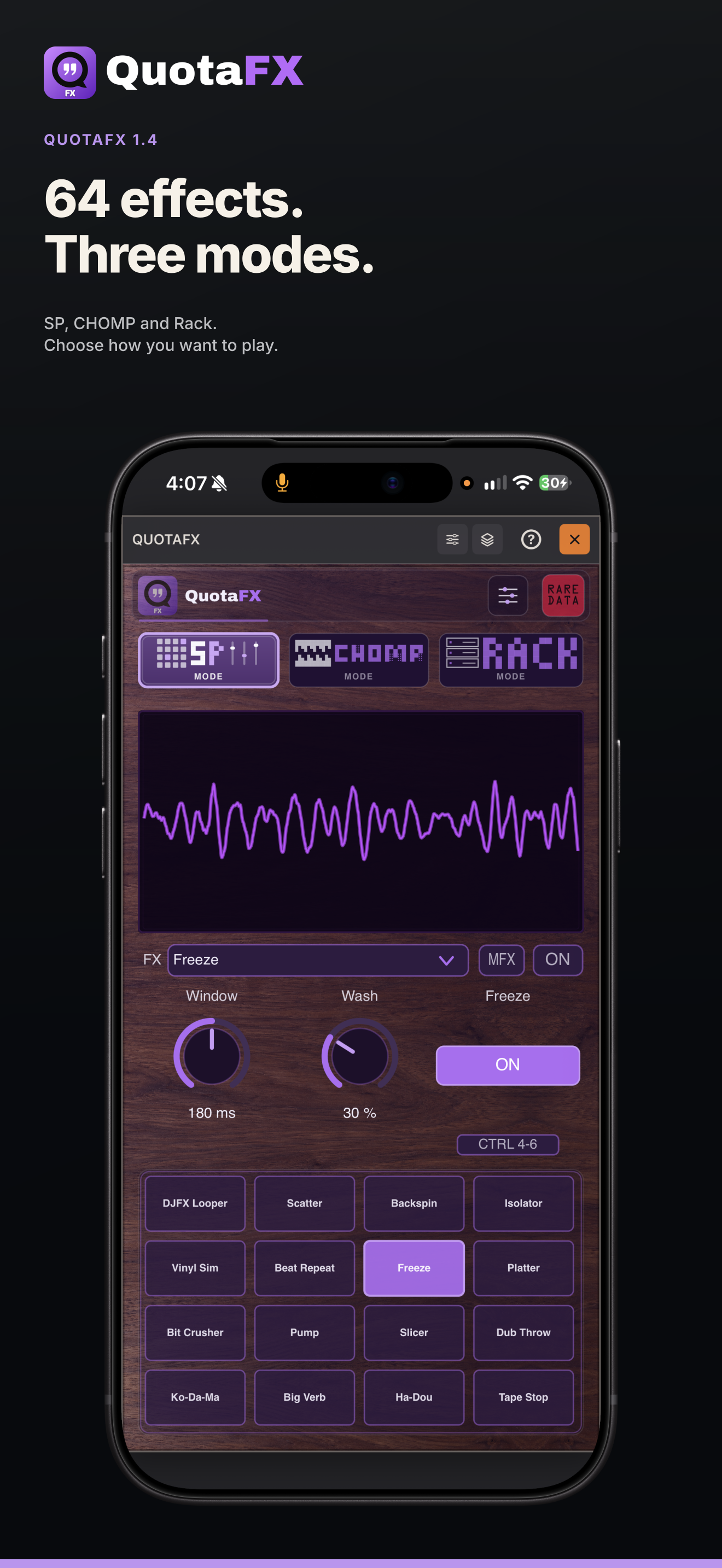
The three modes, shown in the app.
64 effects. Three modes.
SP, CHOMP and Rack give each instance a different way to play.
QuotaFX 1.4, captured by its creator in Compa on iPhone. Open a card at full resolution to see the controls in detail.
Controls, setups and recording.
Set up your controls.
Choose knobs, vertical sliders, horizontal sliders or switches for SP controls. Use momentary or toggle actions, MIDI Learn and your host’s automation.
Tune a CHOMP gesture.
Map a tile’s movement to up to four parameters. Set the endpoints and response curves, save named setups, and import or export a .quotafxsetup file between devices.
Scopes and surfaces.
Choose from seven scope views, steel and wood surfaces, and color palettes. Scope Glass puts the visualization behind the performance controls.
Record the processed audio.
The standalone recorder saves a 24-bit WAV of your performance. Select your input and output, play a live source through the effects, and record the result.
16 additions / 64 total
New in 1.4: 16 effects.
303 VinylSim joins 15 new effects for delay, granular processing, pitch, distortion, resonance and spectral processing. These additions bring the library from 48 to 64.
NEW303 VinylSim
Compression, noise and vinyl-style modulation
NEWDub Matrix
Separate left/right delay times with sync, feedback and reverb
NEWGrain Stretch
Granular time stretching
NEWBuffer Shuffle
Rearranged captured audio
NEWFeedback Drive
Saturation inside a feedback path
NEWPitch Ladder
Echoes that climb or descend by interval
NEWBand Shuffle
Separate rhythmic grids for low and high bands
NEWSpectral Smear
Blur and stretch spectral detail
NEWTwin Drift
Two drifting modulation voices
NEWSpectral Delay
Frequency-shaped echoes
NEWRing Motion
Ring modulation with movement
NEWOrbit
Spatial motion
NEWCarrier
A pitched carrier follows incoming articulation
NEWReverse Room
Reversed ambience
NEWBody Print
Resonators voiced as wood, metal, glass and other bodies
NEWSpectral Gate
Level-dependent spectral openings
The familiar effects, revisited
Updated versions of familiar effects.
DJFX Looper has a revised processing engine, tested by listening alongside the hardware. This update also revises DJFX Delay, Super Filter, Backspin, Scatter, Isolator, Cassette Sim and JUNO Chorus. Existing parameter identities and saved presets are retained.
A free part of the lineup
Meet DJFX Looper.
DJFX Looper is also available as a separate free effect for desktop and the supported Force setup. It uses the same Length, Speed and Loop controls. Its iPhone/iPad release is still pending. Source remains private for this release.
This browser audition compiles the current effect implementations to WebAssembly. Try the 64-effect bank one effect at a time; the native app adds Rack, CHOMP banks, MIDI and host integration.
Hear QuotaFX 1.4’s 64 effects on Rare Data Radio. Select an effect and adjust its controls while the stream plays. The browser player uses QuotaFX’s effect engine; SP, CHOMP and Rack are available in the app.
Press Play, select an effect, and adjust its controls. This player auditions one effect at a time; the app includes all three performance modes.
On your tracks, buses and live inputs.
Load separate QuotaFX instances on tracks, buses and returns in your DAW or AUv3 host. Each instance keeps its own mode, effects and settings; the number you can run depends on your host and available CPU. On iPhone and iPad, use it inside COMPA or another compatible AUv3 host. The standalone app processes your selected audio input.
NEW Linux
VST3 and standalone on Linux x64.
The 1.4 release adds Linux alongside the Mac and Windows desktop editions. Install and update the desktop editions through Rare Data HQ. Mac includes AU, VST3 and standalone; iPhone/iPad includes AUv3 and standalone. Linux uses the system package manager for the .deb installation; a portable archive is available for compatible x86_64 systems.
QuotaFX is an independent Rare Data product. Roland and SP-404MKII names identify the hardware reference and do not imply affiliation or endorsement.
Good to know
How do the three modes differ?
SP runs one selected effect. CHOMP combines performance sliders and saves held combinations in eight banks. Rack runs up to eight ordered, independent inserts.
Can I use several QuotaFX instances?
Yes. Each track, bus or return instance keeps its own mode and effects. Your host and available CPU determine how many you can run.
Does a desktop license include the iPhone/iPad unlock?
The desktop license and the App Store processing unlock are separate purchases. Existing customers retain their current licenses and App Store purchases.
Get QuotaFX
Desktop or iPhone/iPad.
Mac, Windows and Linux
One desktop license: $19.99 USD. Download, install and manage the desktop edition through Rare Data HQ. Existing QuotaFX customers can use their current key.
Universal AU, VST3 and standalone for macOS 11+. VST3 and standalone for Windows x64 and Linux x86_64. HQ’s Mac client requires Apple silicon and macOS 13+; Intel/older supported Macs can use the direct universal installer. Linux .deb targets Ubuntu 24.04; the portable archive requires glibc 2.38+.
iPhone and iPad
AUv3 and standalone in one app. Use it in COMPA or another compatible host, or process a live input on its own. The App Store processing unlock is separate from the desktop license.
 QuotaFX 1.4